Last updated: November 20, 2026. This article is general information, not medical advice. If you follow a diet for a medical condition, ask your doctor or a registered dietitian which numbers on the label matter most for you.
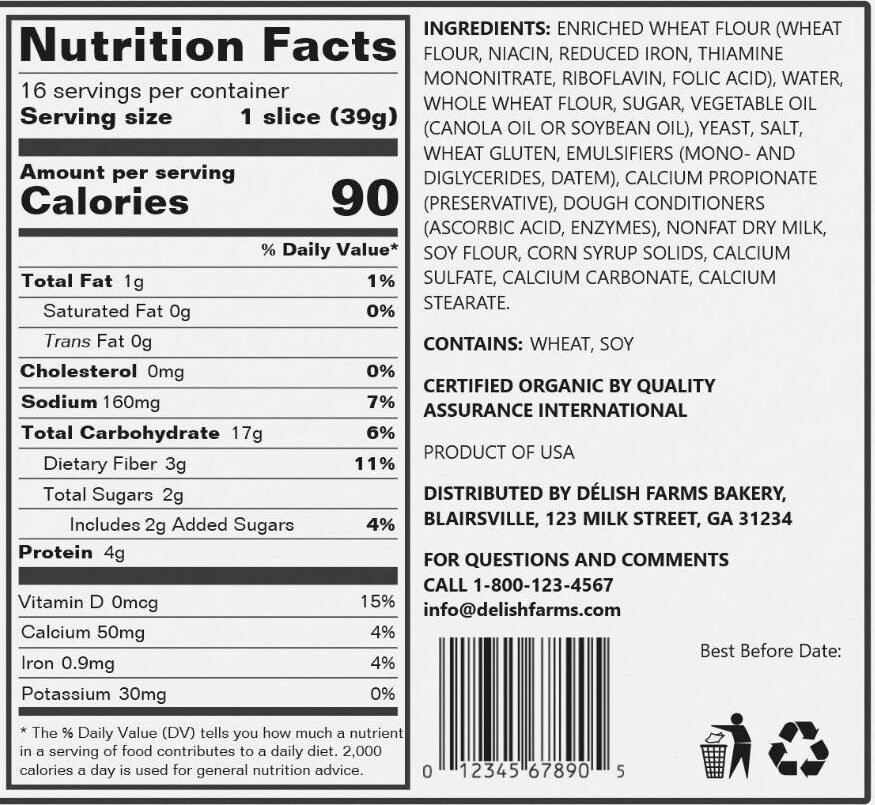
The Nutrition Facts label tells you what’s in one serving of a packaged food, as defined by the manufacturer. The two numbers that matter most are the serving size, because everything else on the label is based on it, and the % Daily Value, which tells you quickly whether a food is high or low in a nutrient.
This guide goes through the US label from top to bottom, shows a worked example with a real-world portion, and explains how to log a label in a tracking app without the mistakes that throw your numbers off.
Start at the top: serving size and servings per container
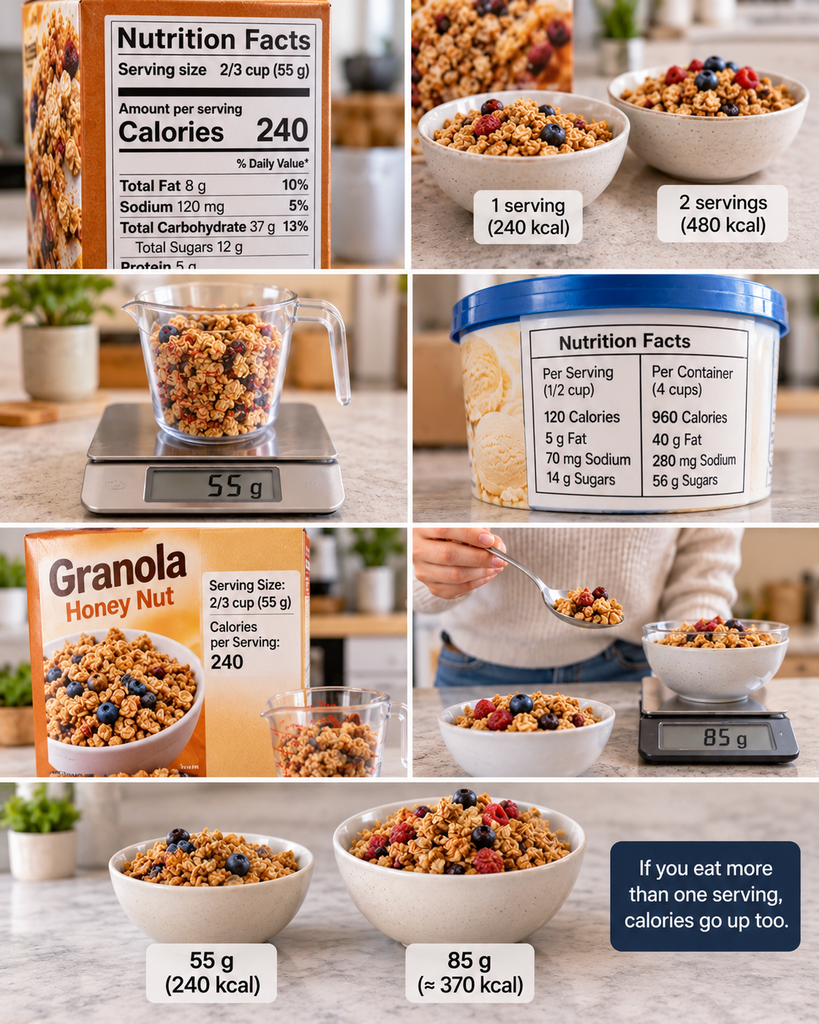
Every number on the label refers to one serving. If you eat two servings, you double everything: calories, fat, sodium, sugar.
The serving size is based on how much people typically eat, not on how much you should eat. It’s shown in a household measure, such as a cup or a number of pieces, followed by the weight in grams. The grams are the more useful number, because a “cup” of cereal can vary a lot depending on how you pour it.
Larger packages that people might finish in one sitting, such as a pint of ice cream or a big bag of chips, often have a dual-column label: one column per serving and one for the whole package. If you tend to eat the whole thing, read the second column.
A worked example
Take a box of granola whose label says:
- Serving size: 2/3 cup (55 g)
- Calories per serving: 240
You pour a bowl without measuring, then put it on a kitchen scale: 85 g. That’s 85 ÷ 55 = about 1.5 servings, so your bowl has roughly 370 calories, not 240. Nothing on the label was wrong; the portion was simply bigger than the serving. This is the most common reason people’s food logs come out lower than reality.
Calories
Calories show how much energy one serving provides. The footnote at the bottom of the label mentions 2,000 calories a day as a general reference for calculating the % Daily Values. That number is a reference point for the label, not a recommendation for you; your needs depend on your age, size, sex and activity level.
Calorie Calculator
Estimate how many calories you need per day to maintain, lose or gain weight, based on your body and activity level.
Daily calories by goal
Click a goal to see your macros.
| Goal | Calories/day |
|---|
Macros for:
These numbers are estimates. Real needs vary by person, so track your weight for 2–3 weeks and adjust by about 100–200 calories if needed. Weekly rates assume roughly 3,500 calories per pound (7,700 per kg) of body weight. The calculator is meant for healthy adults and isn’t suitable during pregnancy or breastfeeding, or for people under 18. It’s for general information only and isn’t medical advice, so talk to your doctor or a registered dietitian before making big changes to your diet.
% Daily Value: the shortcut that saves the most time
The % Daily Value (%DV) shows how much of a day’s reference amount one serving provides. You don’t need to know the grams or milligrams behind it. Use the FDA’s simple rule:
- 5% DV or less per serving is low.
- 20% DV or more per serving is high.
That makes comparing two products fast. If one yogurt has 2% DV for added sugars and another has 24%, you know which one is the high-sugar option without doing any math.
The FDA groups the nutrients on the label into two sets:
| Generally aim for less | Daily Value | Generally aim for more | Daily Value |
|---|---|---|---|
| Saturated fat | 20 g | Dietary fiber | 28 g |
| Sodium | 2,300 mg | Vitamin D | 20 mcg |
| Added sugars | 50 g | Calcium | 1,300 mg |
| Iron | 18 mg | ||
| Potassium | 4,700 mg |
A few lines on the label have no %DV at all: total sugars and trans fat never do, and protein usually doesn’t, unless the package makes a protein claim or the food is meant for young children.
% Daily Value Calculator
Type the amounts from any Nutrition Facts label to see the % Daily Value (%DV) of each nutrient, adjusted for how much you actually eat and your calorie needs.
Know the %DV? Find the amount
Daily Values are the current FDA reference amounts used on US Nutrition Facts labels for adults and children 4 years and older. With a custom calorie level, Daily Values for fat, saturated fat, carbohydrate, fiber, added sugars and protein are scaled from the 2,000-calorie standard; vitamin and mineral Daily Values stay the same. Labels round their %DV, so small differences are normal. This tool is for general information only and isn’t medical or nutrition advice.
Total sugars vs added sugars
Total sugars include sugar that’s naturally in the food, such as the lactose in milk or the fructose in fruit, plus anything added during processing. Added sugars, listed just below, show only what was added: table sugar, syrups, honey and similar ingredients.
This line is the one to watch in foods like yogurt, cereal, granola bars and sauces. Plain yogurt can have several grams of total sugar and zero added sugars; a flavored one can have much more of both.
The ingredient list
The ingredient list isn’t part of the Nutrition Facts panel, but it’s printed next to it and answers questions the panel can’t. Ingredients are listed in order of weight, from most to least. If a sugar or syrup appears near the start, it makes up a large share of the product. Sugars can also appear under several names, such as cane sugar, brown rice syrup or fruit juice concentrate, which spreads them down the list.
Why the numbers aren’t exact
Labels are accurate enough to make good choices, but they’re not lab results for your exact package. Two rules explain why:
- Rounding. FDA rules let manufacturers round small amounts down to zero. A serving with fewer than 5 calories can be labeled “0 calories”, and less than 0.5 g of fat, including trans fat, can be labeled “0 g”. That’s why a spray oil or sweetener packet can say zero calories. It doesn’t matter for one serving, but it adds up if you use several.
- Tolerance. For nutrients you’d want to limit, such as calories, fat, sodium and sugars, a product isn’t considered mislabeled unless lab tests find more than 120% of the amount on the label. So the real number can be somewhat higher than what’s printed.
The practical takeaway: don’t worry about small differences between a label and your app. Logging consistently matters far more than logging perfectly.
How to log a label correctly in your app
Barcode scanners save a lot of time, but most tracking errors happen in the few seconds after the scan. These habits fix most of them:
- Check the serving the app picked. After scanning, the app usually defaults to one serving. Change it to what you actually ate, ideally in grams.
- Log by weight when you can. Grams are more accurate than cups or spoons, especially for cereal, nuts, rice and pasta.
- Match raw or dry with raw or dry. The label on dry pasta, rice or oats refers to the dry weight, and the label on raw meat refers to raw weight. Cooking changes the weight a lot: pasta absorbs water and gets heavier, meat loses water and gets lighter. Weigh before cooking, or use an entry that clearly says “cooked”.
- Trust your package over the database. If the app’s entry doesn’t match the label in your hand, the recipe may have changed or the entry may be wrong. Edit it or create a custom food from the label.
- Remember the “zero” foods. Spray oils, sweeteners and some condiments can be labeled zero per serving. If you use a lot of them, log them anyway.
Not sure which app to use? Our MyFitnessPal vs Lose It! vs Cronometer comparison shows which ones include a free barcode scanner, and our guide to the best weight loss apps covers the wider options.
What’s changing on food labels
Two FDA changes are worth knowing about, because you’ll start seeing their effects on packages:
- A new definition of “healthy”. In December 2024 the FDA updated the rules for using the word “healthy” on packaging. Foods now need to contain a meaningful amount of at least one food group, such as vegetables, fruit, dairy or whole grains, and stay under limits for added sugars, sodium and saturated fat. Manufacturers have until February 2028 to comply, so both old and new uses of the word will be on shelves for a while.
- A proposed front-of-package box. In January 2025 the FDA proposed a small “Nutrition Info” box on the front of most packaged foods, rating saturated fat, sodium and added sugars as low, medium or high. It’s still a proposal; until it’s finalized, the Nutrition Facts panel on the back or side remains the place to look.
Common questions
Is the serving size how much I should eat?
No. It reflects how much people typically eat in one sitting, so labels can be compared fairly. How much you should eat depends on your own needs.
What does “0 g trans fat” mean?
It means less than 0.5 g per serving, not necessarily none. If you eat several servings, those small amounts add up. The ingredient list can help: partially hydrogenated oils were the main source of artificial trans fat and have been largely removed from US foods, but checking for them is still a useful habit.
Why doesn’t my app match the label?
Usually because the app picked a different serving, the database entry was added by another user, or the product’s recipe changed. Your package is the better source; update the entry to match it.
Sources
- FDA: How to understand and use the Nutrition Facts label
- eCFR: 21 CFR 101.9, Nutrition labeling of food
- Federal Register: Definition of the term “healthy” (December 27, 2024)
About the author
Written by Alex Morgan: I evaluate meal services by comparing menu variety, ingredient quality, nutritional information, portion sizes, pricing, delivery reliability, and ease of preparation. I also research customer reviews and assess how well each service accommodates different dietary preferences and lifestyles. My goal is to provide honest, practical comparisons so readers can choose a meal service that suits their needs, budget, and health goals.
This content is for informational purposes only and does not replace professional medical advice, diagnosis or treatment.
Pingback: Calorie Density: How to Build Filling Meals Without Counting Every Calorie – weightprogramguide.com
Pingback: Meal Kits vs Prepared Meals vs Grocery Delivery: What Healthy Eating Really Costs in 2026 – weightprogramguide.com