Last updated: October 16, 2026. This article is general information, not medical advice. Calorie tracking isn’t right for everyone; if you have a history of disordered eating, talk to a healthcare professional before using a tracking app. Some links may be affiliate links; we may earn a commission at no extra cost to you, and it never affects how we compare apps.
Short answer: Cronometer gives you the most for free, including a barcode scanner and detailed nutrient data, and its paid plan is the cheapest at $59.99 a year. MyFitnessPal has the biggest food database, which helps if you eat out a lot, but you’ll want Premium to scan barcodes. Lose It! is the friendliest app for beginners, and its lifetime plan makes sense only if you’ll use it for several years.
Below: what each app gives you without paying, what the upgrades cost over time, how much to trust each food database, and which app fits the way you actually eat.
What you get without paying
For many people the free version is the whole decision, so start here.
| Free plan | MyFitnessPal | Lose It! | Cronometer |
|---|---|---|---|
| Food and calorie logging | Yes | Yes | Yes |
| Barcode scanner | No, Premium only | Being moved to Premium; many new accounts don’t have it | Yes |
| Nutrients | Calories and macros, a few others | Calories and basic nutrition | Up to 84 nutrients |
| Custom macro goals | No, Premium only | No, Premium only | Yes |
| Device syncing | Yes, with many apps and wearables | Limited; most devices need Premium | Yes |
| Reports | Basic | Basic | Last 7 days |
| Ads | Yes | Yes | Yes |
The barcode scanner is the feature that changes daily use the most. Scanning a packaged food takes a few seconds; searching for it and checking you picked the right entry takes much longer. If you mostly eat packaged foods and don’t want to pay, that alone points to Cronometer.
If you pay: prices and what you unlock
| Paid plan | Per year | Per month | Over 3 years | Main additions |
|---|---|---|---|---|
| Cronometer Gold | $59.99 | $10.99 | About $180 | Photo and voice logging, up to 95 nutrients, reports over any time frame, fasting timer, recipe importer, AI coaching (Crono Coach), no ads |
| MyFitnessPal Premium | $79.99 | $19.99 | About $240 | Barcode and photo scanning, voice logging, custom macros, fasting tracker, no ads in logging |
| MyFitnessPal Premium+ | $99.99 | $24.99 | About $300 | Premium plus a meal planner, 1,500+ recipes and grocery lists |
| Lose It! Premium | $79.99 | No monthly plan | About $240 | Barcode scanner, Snap It photo logging, voice logging, macro and nutrient goals, more device syncing, no ads |
| Lose It! Lifetime | $299.99 once ($229.99 for current Premium members) | $299.99 | Everything in Premium, with no renewals | |
Two things stand out. First, the monthly prices are steep compared with paying yearly: MyFitnessPal Premium month to month costs three times as much over a year as the annual plan ($239.88 against $79.99). Only pay monthly for a short test.
Second, Lose It!’s lifetime plan only pays off if you stay a long time. At $79.99 a year, it takes about three years and nine months of Premium to reach $299.99. Most people track in phases rather than for years without a break, so the annual plan is the safer choice unless you already know you’ll keep using it.
All three offer free trials of their paid plans for eligible users, and they run promotions often. If you subscribe through the App Store or Google Play, cancel from there, not from inside the app, and set a reminder before the trial converts.
Food data: a huge database or a verified one
This is the real difference between the apps, and it affects how much you can trust your numbers.
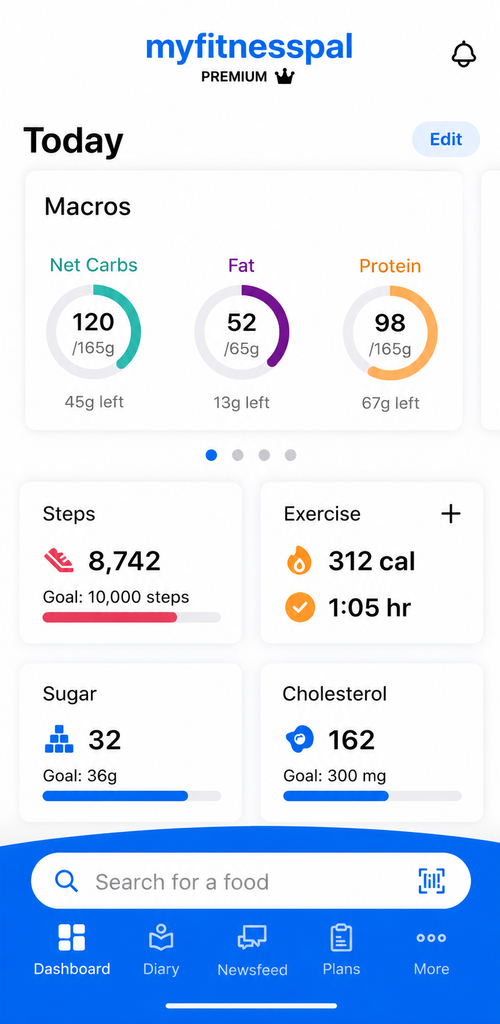
MyFitnessPal has the largest database, with almost any brand or restaurant dish you can think of. Most entries are added by users, though, so a search often returns several versions of the same food with different numbers. Entries marked with a green check have been verified, so pick those when they appear.
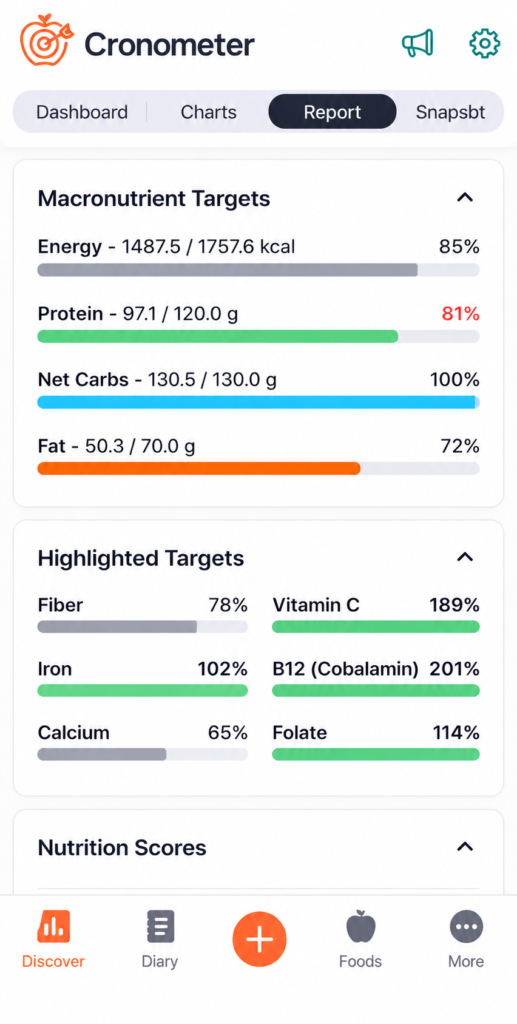
Cronometer builds its database from curated sources such as government and research nutrition databases. You get fewer results, especially for restaurant meals, but the numbers are more reliable and include vitamins and minerals.
Lose It! sits in between: a large database with generally cleaner search results than MyFitnessPal.
A practical habit that improves accuracy in any of the three: log homemade meals as a saved recipe once, using the weight of each ingredient, instead of guessing a portion of a similar dish every time. And don’t worry about small differences between entries. Food labels themselves are estimates, so what matters is logging consistently.
Which app fits the way you eat
You eat out or buy takeout often
MyFitnessPal. Its database is the most likely to have the restaurant dish or chain item you ate. Choose verified entries when you can.
You cook most meals from scratch
Cronometer. Its whole-food data is more precise, and recipes built from weighed ingredients give you reliable numbers you can reuse.
You eat mostly plant-based
Cronometer. It tracks nutrients that are easy to miss on a vegetarian or vegan diet, such as iron, vitamin B12, zinc and omega-3s, on the free plan.
You’re new to tracking and want to stick with it
Lose It!. Its diary is simple, and streaks, badges and group challenges help many beginners keep going past the first few weeks. Check whether your free account still has the barcode scanner.

You use a smartwatch or smart scale
MyFitnessPal or Cronometer, which both sync with devices on their free plans. Lose It! keeps most device syncing for Premium members.
You want meal plans, not just a diary
MyFitnessPal Premium+, the only one of the three with a built-in weekly meal planner and grocery lists.
Before you start tracking
Tracking what you eat can help: research reviews have consistently linked regular self-monitoring with better weight loss results. But it’s a tool, not a rule. If logging every bite starts to cause stress or guilt, take a break, and consider talking to a registered dietitian.
If you find you need more than an app, such as lessons, coaching or a group, see our guide to the best online weight loss programs.
Common questions
Which calorie counting app is best for free?
Cronometer has the most complete free plan of the three, with barcode scanning, custom macro goals and up to 84 nutrients. MyFitnessPal’s free plan has no barcode scanner, and Lose It! is moving its scanner to Premium.

Is Cronometer more accurate than MyFitnessPal?
Generally, yes. Cronometer relies on curated nutrition data, while most MyFitnessPal entries are added by users and can contain errors or duplicates. Choosing verified entries in MyFitnessPal narrows the gap.
Are MyFitnessPal Premium and Lose It! Premium the same price?
Yes, both cost $79.99 a year. MyFitnessPal also offers a monthly option, while Lose It! sells Premium yearly or as a one-time lifetime purchase.
Do I need a program instead of an app?
Not necessarily. An app is enough if you mainly need to understand portions and habits. If motivation or emotional eating is the bigger problem, a program with coaching may help more; our Noom vs WeightWatchers comparison covers two popular options.
Find the Calorie Tracker That Fits You
MyFitnessPal, Lose It! and Cronometer are three of the most popular calorie-counting apps, but each one suits a different kind of user. This interactive tool compares them on what matters to you, so you can find your best match in under a minute.
How to use it:
- Pick a quick-start profile (optional). Choose the one closest to you, such as “I just want to lose weight, simply” or “I care about nutrition details.” The table fills in automatically.
- Choose your budget. Select “Nothing, free only” if you don’t plan to pay. The scores then reflect only what each free plan includes.
- Adjust what’s important to you. Use the dropdown on each row to rate the features from “Don’t care” to “Must have.”
- See your result. Your best match and its match percentage update instantly at the top. The table highlights which app wins each feature, and the cards below show prices, pros and cons.
Tip: there’s no wrong answer. Try different combinations to see how your priorities change the result.
Which calorie tracker fits you best?
Tell us what matters to you and the table updates instantly: MyFitnessPal, Lose It! or Cronometer.
| What matters | How important? | MyFitnessPal | Lose It! | Cronometer |
|---|---|---|---|---|
| Match with your answers |
Scores (1–5) are our editorial assessment based on each app’s public features. Prices are standard US prices checked in November 2026 and can change, vary by region, or be discounted. Check the app store before you subscribe. This tool is for general information only and is not medical or nutrition advice.
How we compared
We reviewed each app’s official pricing and feature pages, help centers and app store listings, and compared free and paid features, food database quality, logging tools, nutrient detail, device syncing and long-term cost. Prices are US prices and may differ by region or promotion. We update this page when pricing or features change.
Sources
About the author
Written by Alex Morgan: I test health and weight loss apps by exploring their features, ease of use, pricing, tracking tools, personalization options, and overall user experience. I also compare user feedback and available evidence to assess how practical, reliable, and useful each app is for everyday life. My goal is to provide honest, straightforward reviews that help readers choose apps that fit their needs, preferences, and lifestyle.
This content is for informational purposes only and does not replace professional medical advice, diagnosis or treatment.
Pingback: Best Weight Loss Apps of 2026: Trackers and Program Apps Compared – weightprogramguide.com
Pingback: How to Read a Nutrition Facts Label (and Log It Correctly in Your App) – weightprogramguide.com