Last updated: 1 oct 2026
Health disclaimer: This article is for general information only and is not medical advice. Calorie tracking is not right for everyone. If you have a history of disordered eating, talk to a healthcare professional before using a tracking app.
Affiliate disclosure: Some links on this page may be affiliate links. If you sign up through them, we may earn a commission at no extra cost to you. This never changes how we rate or rank apps.
Our top picks
Cronometer is the best free weight loss app in 2026: its free plan includes barcode scanning, calories, macros and dozens of vitamins and minerals. MyFitnessPal’s free version is the best choice if you need a huge food database and syncing with lots of fitness apps.
“Free” means very different things in this category. Over the past few years, several popular apps have moved features such as barcode scanning and macro goals behind a paywall. We looked at what you actually get without paying, how many ads you see and which limits matter most for weight loss.
Features and prices were checked in late September 2026. Free plans change often, so confirm what is included when you download.
- Best free app overall: Cronometer
- Best free food database: MyFitnessPal
- Best free app with a fasting timer: YAZIO
- Best free app for iPhone users: Foodnoms
- Best simple free calorie budget: Lose It!
Free weight loss apps compared
| App | Free barcode scanner | Free macros | Ads on free plan | Platforms | Paid upgrade (optional) | Best for |
|---|---|---|---|---|---|---|
| Cronometer | Yes | Yes, plus vitamins and minerals | Yes | iPhone, Android, web | Gold $59.99/yr | Most people |
| MyFitnessPal | No | Calories and macros by percentage | Yes | iPhone, Android, web | Premium $79.99/yr | Large database |
| YAZIO | Reported free by most reviewers; check in app | Basic macros shown | Yes | iPhone, Android | PRO about $47.90/yr | Intermittent fasting |
| Foodnoms | Yes | Core nutrition tracking; extras in Foodnoms+ | No | iPhone, iPad, Apple Watch, Mac | Foodnoms+ $39.99/yr | iPhone users |
| Lose It! | Being moved to Premium | No (Premium) | Yes | iPhone, Android, web | Premium $79.99/yr | Simple calorie budget |
The best free weight loss apps, reviewed
1. Cronometer — Best free app overall
Free plan includes: Food logging with calories, macros and up to 84 nutrients, barcode scanning, custom foods and recipes, device syncing and seven-day reports. Ads are shown.
Cronometer gives away more than any other tracker we compared. Its food data comes from curated, verified sources, so numbers are more reliable than in apps built on user-submitted entries. The free plan is enough for most people trying to lose weight. Gold ($59.99/year) removes ads and adds photo and voice logging, longer reports and a fasting timer.
- Pros: Free barcode scanner; accurate data; detailed nutrition
- Cons: Smaller restaurant database; can feel technical for beginners

2. MyFitnessPal — Best free food database
Free plan includes: Calorie and food logging, exercise and weight tracking, macros by percentage and syncing with 35+ apps and devices. Ads are shown.
MyFitnessPal has the largest food database, which makes logging restaurant and branded foods easy. Its biggest free-plan limit is that barcode scanning has required Premium since 2022, so you search for foods by name instead. Many entries are user-submitted, so double-check numbers that look wrong.
- Pros: Huge database; best app and device integrations
- Cons: No free barcode scanner; heavy ads and upgrade prompts

3. YAZIO — Best free app with a fasting timer
Free plan includes: Calorie tracking, basic macros, weight and water tracking and a basic intermittent fasting timer. Most reviewers report the barcode scanner is free, though YAZIO has changed this before, so check in the app.
YAZIO has a clean, friendly design and is popular in Europe and the US. It suits people who want simple calorie tracking with a basic fasting timer. PRO (about $47.90/year) adds recipes, meal plans, advanced fasting programs and removes ads. Intermittent fasting is not right for everyone, so talk to your doctor first if you have diabetes, take medication or have a history of disordered eating.
- Pros: Easy to use; fasting timer included; affordable upgrade
- Cons: Ads; many extras behind PRO
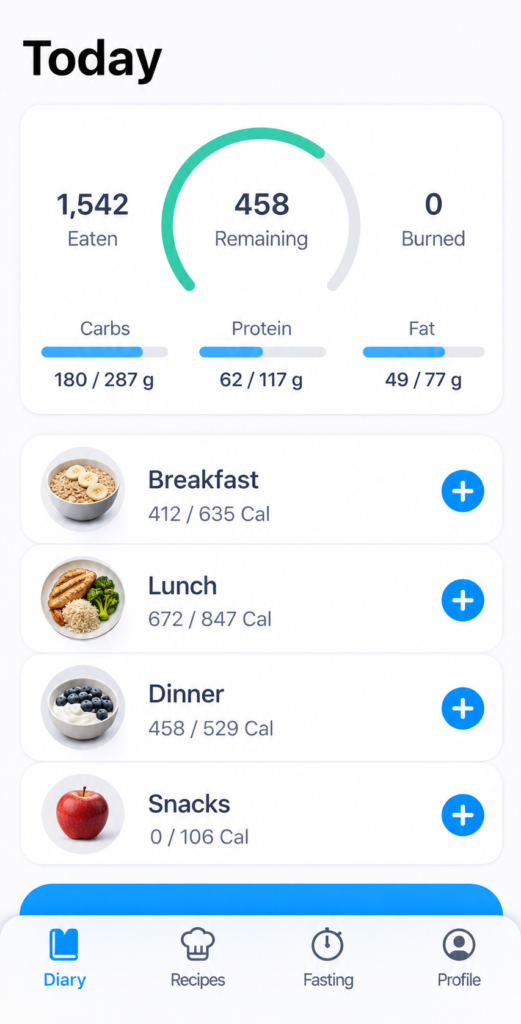
4. Foodnoms — Best free app for iPhone users
Free plan includes: Food logging with free barcode scanning and core nutrition tracking, with no ads. Available only on Apple devices.
Foodnoms is a well-designed tracker for iPhone, iPad, Apple Watch and Mac. Its free plan includes barcode scanning, and it doesn’t show ads. Foodnoms+ ($39.99/year) adds more advanced features, and a family plan covers up to six people.
- Pros: No ads; free barcode scanning; strong Apple integration
- Cons: Not available on Android

5. Lose It! — Best simple free calorie budget
Free plan includes: A personal daily calorie budget and access to a large food database. Ads are shown.
Lose It! has one of the friendliest designs for beginners, with streaks and challenges that keep you motivated. However, its free plan has become more limited: macros, device syncing and, increasingly, the barcode scanner now require Premium ($79.99/year).
- Pros: Very easy to use; motivating design
- Cons: Free plan now limited; no monthly Premium option
For paid options and programs, see our list of the best weight loss apps.

Free vs paid: when is upgrading worth it?
For most people, a free app is enough to lose weight. What matters most is logging consistently, eating balanced meals and staying active, and every app above handles the basics.
Upgrading can make sense if:
- You eat a lot of packaged food and your free app has no barcode scanner. Scanning saves real time every day.
- Ads make you stop using the app. If ads are the reason you quit, a paid plan may be worth it.
- You want macro goals, such as a protein target, and your free app doesn’t support them.
- You want photo or voice logging to make tracking faster.
Tip: before paying, try Cronometer’s free plan, which includes many features other apps charge for.
Don’t forget your phone’s built-in apps
Apple Health, Google Fit and Samsung Health are free and can track steps, activity, sleep and weight. Many food apps sync with them, so you can see everything in one place without paying for another service.
Watch out for “free trials”
Some apps ask for payment details during sign-up and convert a free trial into a yearly charge. If you only want the free plan, skip the trial or set a reminder to cancel before it renews.
Use tracking apps in a healthy way
Food databases and labels are estimates, so small differences don’t matter. A missed day is not a failure. If tracking starts to feel stressful or obsessive, take a break and consider talking to a registered dietitian. The CDC notes that gradual weight loss of about 1–2 pounds per week is more likely to last.
How we chose these apps
We reviewed each app’s official pricing and help pages, app store listings and independent reviews, focusing only on what the free plan includes. We compared barcode scanning, macro tracking, food database quality, ads, platforms and limits. We update this page when free features change.
My experience with the best free weight loss apps
I’ve tried a few different weight loss apps over time, mainly because I wanted to get a better idea of what I was eating without making my daily routine too complicated. I wasn’t looking for anything extreme or a quick fix. I just wanted a simple way to track my meals, understand my eating habits, and stay a little more consistent. After comparing Cronometer, MyFitnessPal, YAZIO, Foodnoms, and Lose It!, I realized that each app has its own strengths, and the best choice really depends on what you’re looking for.
MyFitnessPal was probably the easiest one to get started with. I liked being able to search for foods quickly and log most of my meals without spending too much time on it. The food database is one of its biggest advantages, especially when you eat packaged products or meals from different restaurants. However, I sometimes found the amount of information and premium features a little overwhelming. For everyday use, though, it felt like a practical option.
Cronometer gave me a different perspective on nutrition. Instead of focusing only on calories, it also lets you keep track of vitamins, minerals, and other nutrients. I found this particularly useful when I wanted to understand whether I was eating a balanced diet rather than simply trying to eat less. The interface took a little getting used to, but I appreciated how detailed the information was. If you enjoy looking at nutritional data, this is definitely an app worth considering.
YAZIO stood out to me because of its clean design. Everything felt quite straightforward, and logging meals was relatively easy once I got into the habit. I also liked that it offered a more structured approach to food tracking, which could be helpful if you prefer having a clear daily plan. On the other hand, some of the extra features are reserved for the paid version, so the free experience can feel a bit limited depending on what you want to do.
Foodnoms was one of the more interesting options for me, especially because of its focus on simplicity. I liked the idea of tracking what I eat without turning every meal into a complicated calculation. It felt more suited to someone who wants useful nutritional information in a straightforward format. One thing to keep in mind is that Foodnoms is primarily designed for Apple devices, so it may not be the best choice if you use an Android phone.
Lose It! was another app I could see myself using regularly. Its main appeal is that it makes calorie tracking feel fairly simple and goal-oriented. I liked the idea of having a clear daily target instead of constantly guessing how much I was eating. The overall experience felt approachable, although, as with the other apps, some useful features require a subscription.
After comparing all five, I don’t think there’s one app that is automatically the best for everyone. MyFitnessPal makes sense if you want a large food database, Cronometer is a strong option for tracking nutrients, YAZIO offers a user-friendly experience, Foodnoms is appealing if you prefer a simpler approach and use an Apple device, and Lose It! is worth considering if you want to focus on calorie tracking.
The biggest thing I learned is that an app is only useful if you can actually stick with it. Spending too much time logging every ingredient can quickly become frustrating, so I would choose something that fits naturally into my routine rather than the app with the most features.
If I were choosing a free weight loss app today, I would start by thinking about what matters most to me: simplicity, detailed nutrition information, or an easy way to monitor calories. I would also check which features are genuinely available for free before committing to one app.
Most importantly, I wouldn’t treat any of these apps as a magic solution. They can help you become more aware of your eating habits and make more informed choices, but long-term progress comes from building habits you can maintain. For me, that is what makes a good weight loss app genuinely useful.
Frequently asked questions
What is the best free weight loss app?
Cronometer has the best free plan of the apps we compared, with barcode scanning, calories, macros and detailed nutrition data. MyFitnessPal is a good free choice if you mainly need a very large food database.
Is there a completely free calorie counter with a barcode scanner?
Yes. Cronometer’s free plan includes barcode scanning, and so does Foodnoms on Apple devices. MyFitnessPal’s free plan does not, and Lose It! is moving its scanner to Premium.
Is MyFitnessPal still free?
Yes, MyFitnessPal has a free plan with food logging, exercise tracking and app syncing, but it shows ads and doesn’t include the barcode scanner or custom macro goals.
Can you lose weight with a free app?
Yes. Free apps can help you understand portions and eating habits, which supports weight loss. Results depend on consistent habits, not on paying for an app.
Are free weight loss apps safe to use?
For most adults, yes. But calorie tracking isn’t right for everyone, especially people with a history of disordered eating. Talk to a healthcare professional if you’re unsure.
Sources
- Amy Food Journal: Cronometer review (2026)
- MyFitnessPal: Membership pricing tiers
- RecurDash: MyFitnessPal pricing (verified July 2026)
- Bento Bunny: YAZIO review (2026)
- NutriScan: Is YAZIO PRO worth it? (2026)
- Foodnoms vs MyFitnessPal
- Lose It!: Membership tiers and pricing
- CDC: Steps for losing weight
About the author
Written by Alex Morgan: I test health and weight loss apps by exploring their features, ease of use, pricing, tracking tools, personalization options, and overall user experience. I also compare user feedback and available evidence to assess how practical, reliable, and useful each app is for everyday life. My goal is to provide honest, straightforward reviews that help readers choose apps that fit their needs, preferences, and lifestyle.
This content is for informational purposes only and does not replace professional medical or nutrition advice.